 Fireblaze
 Learning Guides
Transaction Control Language (TCL) in SQL: Complete Beginner's Guide

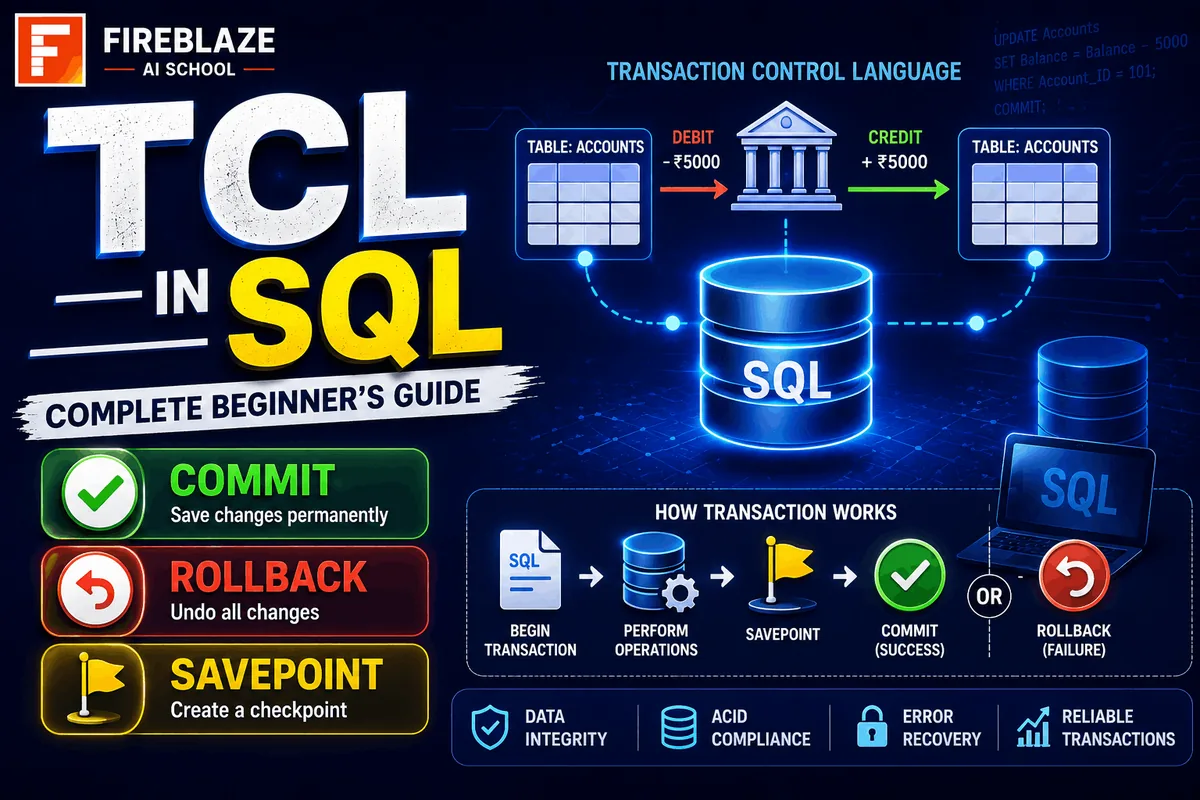
SQL is one of the most important skills for Data Analysts, Data Scientists, Database Administrators, and Software Developers. When working with databases, it is important to manage transactions properly to ensure data accuracy and consistency.
This is where Transaction Control Language (TCL) comes into play.
TCL commands help control database transactions and ensure that changes are either permanently saved or safely reversed when necessary.
In this guide, you'll learn:
What Transaction Control Language (TCL) is
Why TCL is important
TCL commands in SQL
COMMIT, ROLLBACK, and SAVEPOINT
Real-world examples
Interview questions
Best practices
What is Transaction Control Language (TCL)?
Transaction Control Language (TCL) is a category of SQL commands used to manage transactions in a database.
A transaction is a group of SQL operations executed as a single unit of work.
For example:
A banking transaction may involve:
Deducting money from one account
Adding money to another account
Both operations must either succeed together or fail together.
TCL ensures database consistency and integrity during such operations.
What is a Transaction?
A transaction is a sequence of SQL statements executed together.
Example:
UPDATE Accounts\nSET Balance = Balance - 500\nWHERE Account_ID = 101;\n\nUPDATE Accounts\nSET Balance = Balance + 500\nWHERE Account_ID = 102;\nThese two operations form a single transaction.
If one operation fails, the database should return to its previous state.
Why is TCL Important?
TCL helps:
Maintain data consistency
Prevent partial updates
Recover from errors
Ensure reliable transactions
Protect critical business operations
Industries that heavily rely on TCL:
Banking
Finance
E-commerce
Healthcare
Enterprise Software
TCL Commands in SQL
The main TCL commands are:
| Command | Purpose |
|---|---|
| COMMIT | Save changes permanently |
| ROLLBACK | Undo changes |
| SAVEPOINT | Create checkpoints within transactions |
COMMIT Command
The COMMIT command permanently saves all changes made during a transaction.
Syntax
COMMIT;\nExample
UPDATE Employees\nSET Salary = Salary + 5000\nWHERE Employee_ID = 101;\n\nCOMMIT;\nAfter COMMIT:
Changes become permanent
Cannot be undone using ROLLBACK
ROLLBACK Command
The ROLLBACK command reverses changes made during a transaction.
Syntax
ROLLBACK;\nExample
UPDATE Employees\nSET Salary = Salary + 5000\nWHERE Employee_ID = 101;\n\nROLLBACK;\nResult:
Changes are canceled
Database returns to previous state
SAVEPOINT Command
SAVEPOINT creates a checkpoint within a transaction.
You can roll back to a specific point instead of undoing the entire transaction.
Syntax
SAVEPOINT savepoint_name;\nExample
UPDATE Accounts\nSET Balance = Balance - 1000\nWHERE Account_ID = 1;\n\nSAVEPOINT Transfer_Point;\n\nUPDATE Accounts\nSET Balance = Balance + 1000\nWHERE Account_ID = 2;\nIf an error occurs later:
ROLLBACK TO Transfer_Point;\nThe database rolls back only to the savepoint.
TCL Workflow Example
Consider a banking transaction.
Step 1
UPDATE Accounts\nSET Balance = Balance - 5000\nWHERE Account_ID = 101;\nStep 2
SAVEPOINT Amount_Deducted;\nStep 3
UPDATE Accounts\nSET Balance = Balance + 5000\nWHERE Account_ID = 102;\nStep 4
COMMIT;\nIf Step 3 fails:
ROLLBACK TO Amount_Deducted;\nThis prevents incorrect account balances.
Properties of Transactions (ACID)
TCL works closely with ACID properties.
Atomicity
A transaction is treated as a single unit.
Either:
All operations succeed
Or all fail
Consistency
The database remains valid before and after transactions.
Isolation
Transactions do not interfere with each other.
Durability
Committed changes remain permanent even after system failures.
Real-World Applications of TCL
Banking Systems
Used for:
Fund transfers
Loan processing
Account updates
E-commerce Platforms
Used during:
Order placement
Payment processing
Inventory updates
Healthcare Systems
Used for:
Patient records
Billing systems
Appointment management
Airline Reservation Systems
Used for:
Ticket booking
Seat allocation
Payment transactions
Difference Between COMMIT and ROLLBACK
| COMMIT | ROLLBACK |
|---|---|
| Saves changes permanently | Undoes changes |
| Cannot be reversed | Restores previous state |
| Used after successful transaction | Used when errors occur |
Difference Between SAVEPOINT and COMMIT
| SAVEPOINT | COMMIT |
|---|---|
| Creates checkpoint | Saves entire transaction |
| Allows partial rollback | Makes changes permanent |
| Temporary marker | Final operation |
TCL Interview Questions
What is TCL in SQL?
Transaction Control Language (TCL) is used to manage database transactions and maintain data integrity.
What are TCL commands?
Main TCL commands:
COMMIT
ROLLBACK
SAVEPOINT
What is COMMIT?
COMMIT permanently saves changes made during a transaction.
What is ROLLBACK?
ROLLBACK reverses changes made during a transaction.
What is SAVEPOINT?
SAVEPOINT creates a checkpoint within a transaction that allows partial rollback.
Why is TCL important?
TCL ensures:
Data consistency
Transaction reliability
Error recovery
Best Practices for Using TCL
Use COMMIT only after verifying transaction success.
Create SAVEPOINTS during complex operations.
Use ROLLBACK when errors occur.
Test transactions carefully.
Follow ACID principles.
Why TCL Matters for Data Analytics and Database Careers
Professionals working in:
Data Analytics
Data Science
Database Administration
Backend Development
Software Engineering
must understand transaction management.
Many business-critical applications depend on secure and reliable database operations.
Understanding TCL helps professionals design systems that protect data and maintain consistency during complex operations.
Final Thoughts
Transaction Control Language (TCL) is an essential part of SQL that helps manage database transactions safely and efficiently. Commands like COMMIT, ROLLBACK, and SAVEPOINT ensure that data remains accurate, consistent, and secure even when errors occur.
Whether you're preparing for SQL interviews, learning database management, or building enterprise applications, mastering TCL is a fundamental step toward becoming a strong SQL and database professional.
Keep Reading
Related Articles
Learning Guides
Introduction to Computer Vision: A Beginner’s Guide
Discover the basics of Computer Vision, a rapidly growing field of Artificial Intelligence that enables machines to understand images and videos. Expl
All About PyCaret: Conversation with Mr. Moez Ali and Mr. Aniruddha Kalbande | EP-06
Explore PyCaret and its impact on machine learning development through an insightful conversation with PyCaret creator Moez Ali and AI expert Aniruddh
What is Data Mining? Complete Guide for Beginners
Learn what Data Mining is, how it works, key techniques, tools, applications, advantages, challenges, and its role in Data Science, Machine Learning,