 Fireblaze
 Learning Guides
Sending Multiple Emails Using Python: A Complete Beginner's Guide
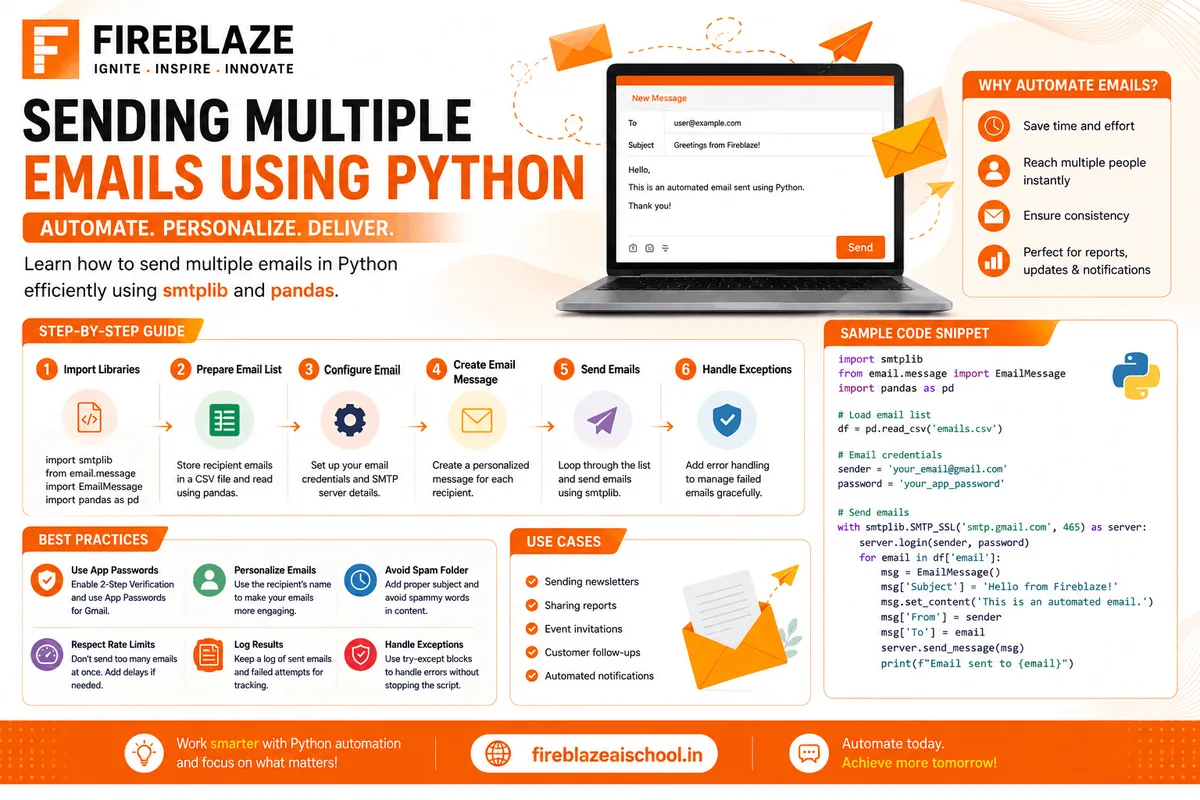
Email automation is one of the most useful applications of Python in business, marketing, customer support, and software development. Instead of manually sending hundreds of emails, Python allows developers to automate the entire process efficiently.
Whether you're sending newsletters, notifications, reports, marketing campaigns, or personalized messages, Python can help save time and improve productivity.
In this guide, you'll learn how to send multiple emails using Python, understand SMTP, automate email workflows, and explore real-world applications.
Why Automate Emails Using Python?
Organizations send thousands of emails every day for:
Marketing Campaigns
Customer Notifications
OTP Verification
System Alerts
Report Distribution
Educational Announcements
Python automation helps:
Reduce manual effort
Improve efficiency
Personalize communication
Schedule email campaigns
Handle large email lists
What is SMTP?
SMTP stands for:
Simple Mail Transfer Protocol
SMTP is the standard protocol used to send emails over the internet.
Python uses SMTP servers to communicate with email providers such as:
Gmail
Outlook
Yahoo Mail
Business Email Servers
Python Libraries Required
Python provides built-in libraries for email automation.
smtplib
Used for sending emails.
import smtplib
Used for formatting email messages.
from email.message import EmailMessage
Sending a Simple Email
Example:
import smtplib
from email.message import EmailMessage

msg = EmailMessage()

msg['Subject'] = "Hello"

msg['From'] = "your_email@gmail.com"

msg['To'] = "receiver@gmail.com"

msg.set_content(
    "This is a test email."
)

with smtplib.SMTP_SSL(
    'smtp.gmail.com',
    465
) as smtp:

    smtp.login(
        'your_email@gmail.com',
        'your_password'
    )

    smtp.send_message(msg)
This sends a basic email through Gmail.
Understanding the Workflow
The process involves:
Create Email Message
Connect to SMTP Server
Authenticate Account
Send Email
Close Connection
This workflow is used in most email automation systems.
Sending Emails to Multiple Recipients
Suppose you have a list of recipients:
emails = [
    "user1@gmail.com",
    "user2@gmail.com",
    "user3@gmail.com"
]
You can send emails using a loop:
for email in emails:

    msg = EmailMessage()

    msg['Subject'] = "Welcome"

    msg['From'] = "your_email@gmail.com"

    msg['To'] = email

    msg.set_content(
        "Welcome to Fireblaze AI School"
    )

    smtp.send_message(msg)
This automatically sends emails to all recipients.
Sending Personalized Emails
Personalization improves engagement.
Example:
users = {
    "Rahul":"rahul@gmail.com",
    "Priya":"priya@gmail.com"
}
for name,email in users.items():

    msg = EmailMessage()

    msg['Subject'] = "Greetings"

    msg['To'] = email

    msg.set_content(
        f"Hello {name}, welcome!"
    )

    smtp.send_message(msg)
Each recipient receives a personalized message.
Reading Email Data from a CSV File
For large email campaigns, data is often stored in CSV files.
Example CSV:
Name,Email
Rahul,rahul@gmail.com
Priya,priya@gmail.com
Aman,aman@gmail.com
Load CSV using Pandas:
import pandas as pd

df = pd.read_csv(
    "emails.csv"
)
Send emails:
for index,row in df.iterrows():

    email = row['Email']

    name = row['Name']
This approach is commonly used in bulk email automation.
Sending HTML Emails
HTML emails provide better formatting.
Example:
msg.add_alternative(
"""
<h1>Welcome</h1>
<p>Thanks for joining.</p>
""",
subtype='html'
)
Benefits:
Professional design
Better engagement
Rich formatting
Sending Email Attachments
Attachments can include:
PDF Reports
Certificates
Images
Documents
Example:
with open(
    'report.pdf',
    'rb'
) as file:

    msg.add_attachment(
        file.read(),
        maintype='application',
        subtype='pdf',
        filename='report.pdf'
    )
Useful for automated report distribution.
Using Gmail App Passwords
Google no longer recommends using regular passwords for SMTP access.
Instead:
Enable Two-Factor Authentication.
Generate an App Password.
Use the App Password in Python scripts.
This improves security significantly.
Error Handling
Email delivery can fail due to:
Invalid Addresses
Network Issues
Authentication Errors
Example:
try:

    smtp.send_message(msg)

except Exception as e:

    print(e)
Error handling improves reliability.
Scheduling Automated Emails
You can schedule emails using:
schedule Library
import schedule
Example:
schedule.every().day.at(
"09:00"
).do(send_email)
Applications:
Daily Reports
Weekly Updates
Reminder Systems
Real-World Applications
Marketing Automation
Send promotional campaigns automatically.
Educational Institutions
Send:
Admission Updates
Course Announcements
Certificates
Business Reporting
Automatically distribute reports to stakeholders.
Customer Support
Send:
Ticket Updates
Notifications
Alerts
HR Management
Automate:
Offer Letters
Interview Invitations
Employee Notifications
Best Practices for Bulk Email Sending
Personalize Messages
Personalized emails achieve better engagement.
Validate Email Addresses
Remove invalid addresses before sending.
Limit Sending Rate
Avoid sending thousands of emails instantly.
Use Professional Templates
HTML templates improve readability.
Track Delivery Metrics
Monitor:
Open Rates
Click Rates
Bounce Rates
Sending Multiple Emails with Python and Pandas
A common industry workflow:
Store recipients in CSV.
Read data using Pandas.
Personalize messages.
Send emails using SMTP.
Log successful deliveries.
This workflow powers many email automation systems.
Interview Questions on Email Automation
What is SMTP?
SMTP stands for Simple Mail Transfer Protocol and is used to send emails.
Which Python Library is Used to Send Emails?
The most common library is:
smtplib
How Do You Send Emails to Multiple Users?
By storing email addresses in a list or file and using loops.
Why Use App Passwords Instead of Gmail Passwords?
App passwords improve security and prevent exposing primary account credentials.
How Do You Send Attachments?
Using:
add_attachment()
Why Learn Email Automation?
Email automation is a practical Python skill used in:
Data Analytics
Business Automation
Marketing Technology
Customer Support Systems
SaaS Applications
It is often integrated with databases, dashboards, and reporting systems.
Career Applications
Professionals who understand email automation can build:
Marketing Platforms
CRM Systems
Lead Management Systems
Reporting Tools
Notification Services
These skills are highly valuable for Python Developers and Automation Engineers.
Final Thoughts
Sending multiple emails using Python is a powerful automation technique that saves time and increases productivity. By combining SMTP, email templates, CSV data, and scheduling tools, developers can create scalable email automation solutions for businesses and organizations.
Whether you're a beginner learning Python or a professional building automation systems, mastering email automation is a valuable skill that can be applied across numerous industries and projects.
Keep Reading
Related Articles
Learning Guides
Introduction to Computer Vision: A Beginner’s Guide
Discover the basics of Computer Vision, a rapidly growing field of Artificial Intelligence that enables machines to understand images and videos. Expl
All About PyCaret: Conversation with Mr. Moez Ali and Mr. Aniruddha Kalbande | EP-06
Explore PyCaret and its impact on machine learning development through an insightful conversation with PyCaret creator Moez Ali and AI expert Aniruddh
What is Data Mining? Complete Guide for Beginners
Learn what Data Mining is, how it works, key techniques, tools, applications, advantages, challenges, and its role in Data Science, Machine Learning,