 Fireblaze
Learning Guides
Joins in SQL Explained: INNER, LEFT, RIGHT and FULL JOIN With Real Examples
Joins in SQL explained with real outputs: INNER, LEFT, RIGHT, FULL, CROSS and self joins, tested on MySQL, PostgreSQL and SQLite, plus a free dataset.

Most guides to joins in SQL show you two coloured circles and call it a day.
Then you run a LEFT JOIN at work, the total looks too high, and the Venn diagram has nothing to say about why.
This guide is different. We ran every join below on one small dataset in three databases (MySQL 8, PostgreSQL 16 and SQLite 3.53) and copied the real outputs. You'll see:
- What each join type returns, with exact row counts
- Three bugs that give wrong answers without any error
- A 1-million-row speed test of the three ways to find "rows with no match"
Let's get started.
Joins in SQL are clauses that combine rows from two or more tables using a related column, usually a primary key in one table and a foreign key in the other. The join type decides what happens to rows that find no match: INNER JOIN drops them, LEFT, RIGHT and FULL OUTER JOIN keep them with NULLs, and CROSS JOIN pairs every row with every row.
Quick answer: joins in SQL (November 2026)
- INNER JOIN keeps only matching rows: on our 11-employee, 5-department dataset it returned 10 rows.
- LEFT JOIN keeps every row from the left table (11 rows), RIGHT JOIN every row from the right table (11 rows) and FULL OUTER JOIN both (12 rows).
- CROSS JOIN returns every combination, so 11 employees x 5 departments gave 55 rows in MySQL 8.0, PostgreSQL 16 and SQLite 3.53.
- MySQL 8.0 rejects FULL OUTER JOIN with error 1064, so you combine a LEFT JOIN and a RIGHT JOIN with UNION ALL instead.
- In our November 2026 test on 1 million orders, NOT EXISTS and LEFT JOIN found unmatched rows in about 0.1 seconds on PostgreSQL 16, while NOT IN ran for over 60 seconds.
Contents
- Joins in SQL With Example Data: The Practice Dataset
- Types of Joins in SQL at a Glance
- INNER JOIN: Only the Rows That Match
- LEFT JOIN: Keep Every Row From the Left Table
- RIGHT JOIN: The Mirror Image
- FULL OUTER JOIN and the MySQL Workaround
- CROSS JOIN: Every Possible Combination
- Self Join: Joining a Table to Itself
- Equi, Non-Equi, NATURAL and USING Joins
- How to Join 3 or More Tables in SQL
- ON vs WHERE: Where Your Filter Goes Changes the Answer
- Why Joins in SQL Return Duplicate Rows
- The ROW Check: 3 Questions Before You Write Any Join
- Which Joins in SQL Are Fastest? We Tested 1 Million Rows
- SQL Joins for Excel and Power BI Users
- Practice Questions on Joins in SQL
- FAQ
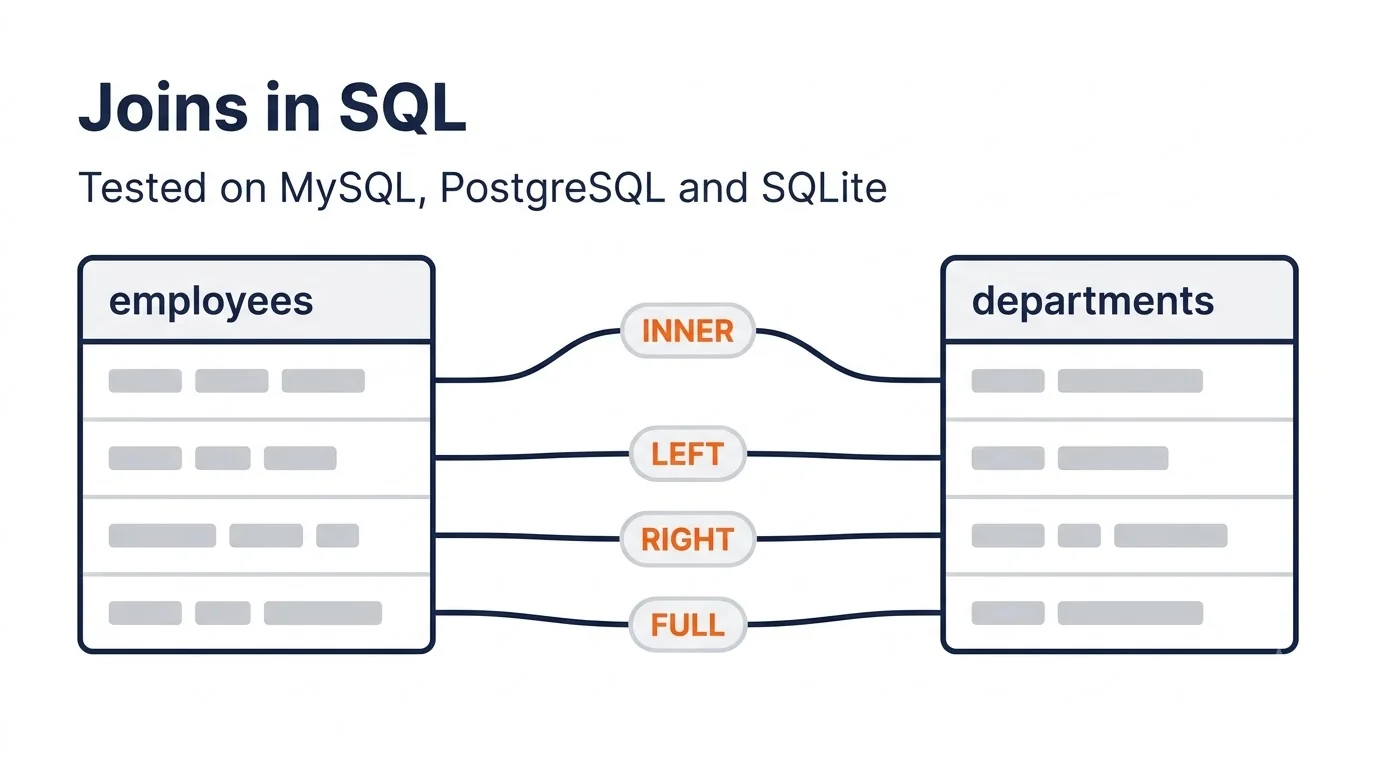 One dataset, every join type, real outputs from three
databases.
Joins in SQL With Example Data: The Practice Dataset
The Fireblaze SQL practice dataset has four small tables (departments, employees, customers, orders) and 36 rows. It's the same dataset used in our SQL interview questions guide, so you can move between the two without setting anything up again.
It's built to break naive joins on purpose:
- Mayur Raut has no department (
dept_idis NULL). - Research is a department with no employees.
- Wardha Textiles is a customer that never ordered.
- Orders 1011 and 1012 are a duplicate pair for Deccan Retail.
Here are the two tables you'll see most:
employees (salary is monthly, in INR)
| emp_id | emp_name | dept_id | manager_id | salary |
|---|---|---|---|---|
| 1 | Anita Deshmukh | 20 | NULL | 2,10,000 |
| 2 | Rahul Patil | 10 | 1 | 1,20,000 |
| 3 | Sneha Kulkarni | 10 | 2 | 65,000 |
| 4 | Vikram Joshi | 10 | 2 | 65,000 |
| 5 | Pooja Wankhede | 10 | 2 | 48,000 |
| 6 | Amit Shinde | 20 | 1 | 95,000 |
| 7 | Neha Bhosale | 20 | 6 | 1,05,000 |
| 8 | Karan Mehta | 30 | 1 | 55,000 |
| 9 | Riya Gawande | 30 | 8 | 42,000 |
| 10 | Sagar Thakre | 40 | 1 | NULL |
| 11 | Mayur Raut | NULL | 2 | 38,000 |
departments
| dept_id | dept_name | city |
|---|---|---|
| 10 | Analytics | Nagpur |
| 20 | Engineering | Pune |
| 30 | Sales | Nagpur |
| 40 | HR | Nagpur |
| 50 | Research | Pune |
customers: 101 Orange City Traders (Nagpur), 102 Deccan Retail (Pune), 103 Vidarbha Agro (Nagpur), 104 Konkan Foods (Mumbai), 105 Sitabuldi Mobiles (Nagpur), 106 Wardha Textiles (Wardha). orders: 14 orders from January to May 2026, 12 of them Delivered.
Download: fireblaze_sql_practice.sql. It runs on MySQL 8, PostgreSQL 13+ and SQLite 3.39+.
How we tested: on 18 November 2026 we loaded the dataset into SQLite 3.53.1, PostgreSQL 16.15 and MySQL 8.0.46 and ran every SQL join query in this guide on all three. Outputs below are copied from those runs, and where the databases disagreed, we say so.
Types of Joins in SQL at a Glance
There are four main types of joins in SQL (INNER, LEFT, RIGHT and FULL OUTER) plus CROSS JOIN and the self join. The table below shows what each one returned on the employees (11 rows) and departments (5 rows) tables, so you can see the SQL join types side by side instead of as circles.
| Join type | What it keeps | Rows returned | Unmatched rows shown as |
|---|---|---|---|
| INNER JOIN | Only matching pairs | 10 | Dropped |
| LEFT JOIN | All employees + matches | 11 | NULL department for Mayur |
| RIGHT JOIN | All departments + matches | 11 | NULL employee for Research |
| FULL OUTER JOIN | Everything from both | 12 | NULL on either side |
| CROSS JOIN | Every combination | 55 | Not applicable |
| Self join (employee to manager, LEFT) | Each employee + their manager | 11 | NULL manager for Anita |
| Anti join (LEFT JOIN + IS NULL) | Left rows with no match | 1 (customers) | Only the unmatched rows |
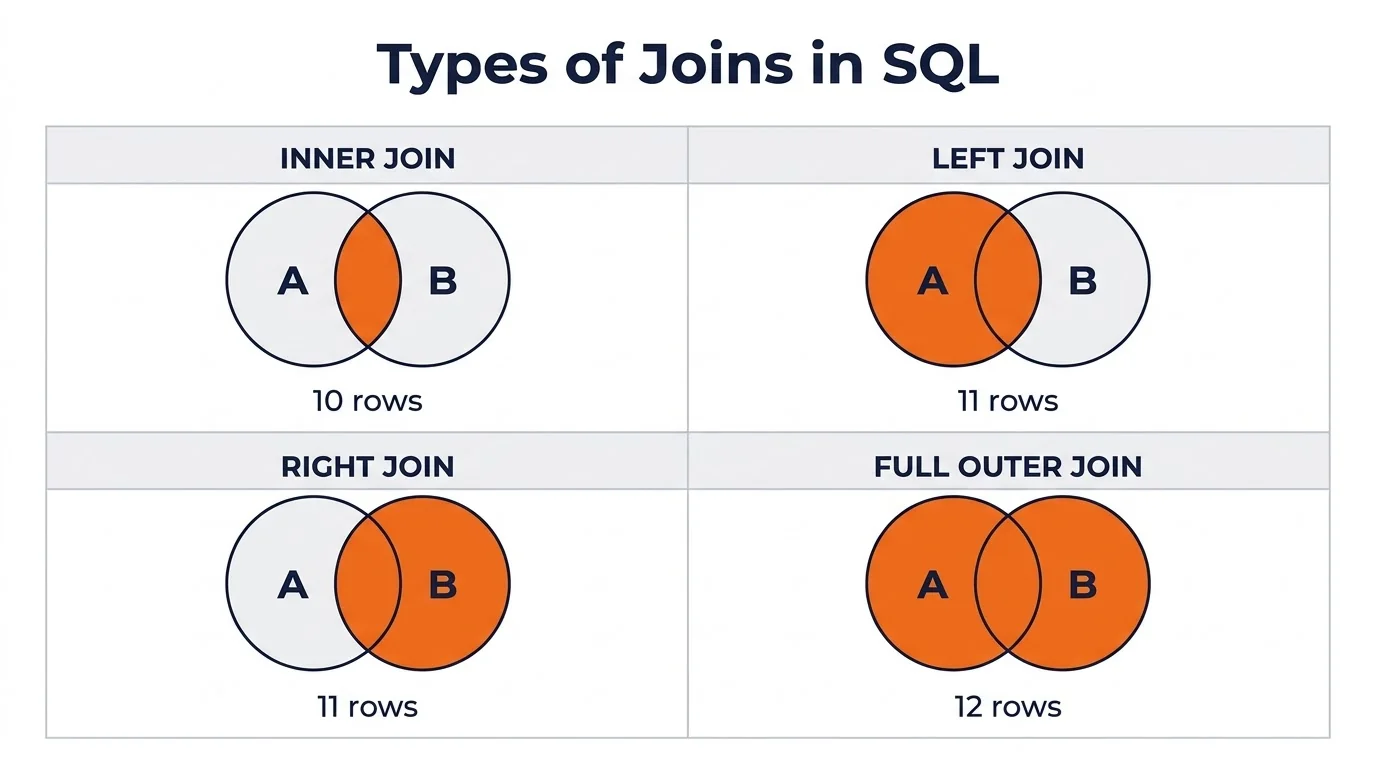 The Venn diagram shows which rows survive. The numbers show how
many.
Venn diagrams are a handy memory aid, but they hide one thing: a join can return MORE rows than either table when keys repeat. We'll get to that in the duplicates section.
INNER JOIN: Only the Rows That Match
An INNER JOIN returns a row only when the join condition is true on both sides. Rows without a partner in the other table disappear from the result.
SELECT e.emp_name, d.dept_name
FROM employees e
INNER JOIN departments d ON e.dept_id = d.dept_id
ORDER BY e.emp_id;| emp_name | dept_name |
|---|---|
| Anita Deshmukh | Engineering |
| Rahul Patil | Analytics |
| Sneha Kulkarni | Analytics |
| Vikram Joshi | Analytics |
| Pooja Wankhede | Analytics |
| Amit Shinde | Engineering |
| Neha Bhosale | Engineering |
| Karan Mehta | Sales |
| Riya Gawande | Sales |
| Sagar Thakre | HR |
That's 10 rows, identical on all three databases.
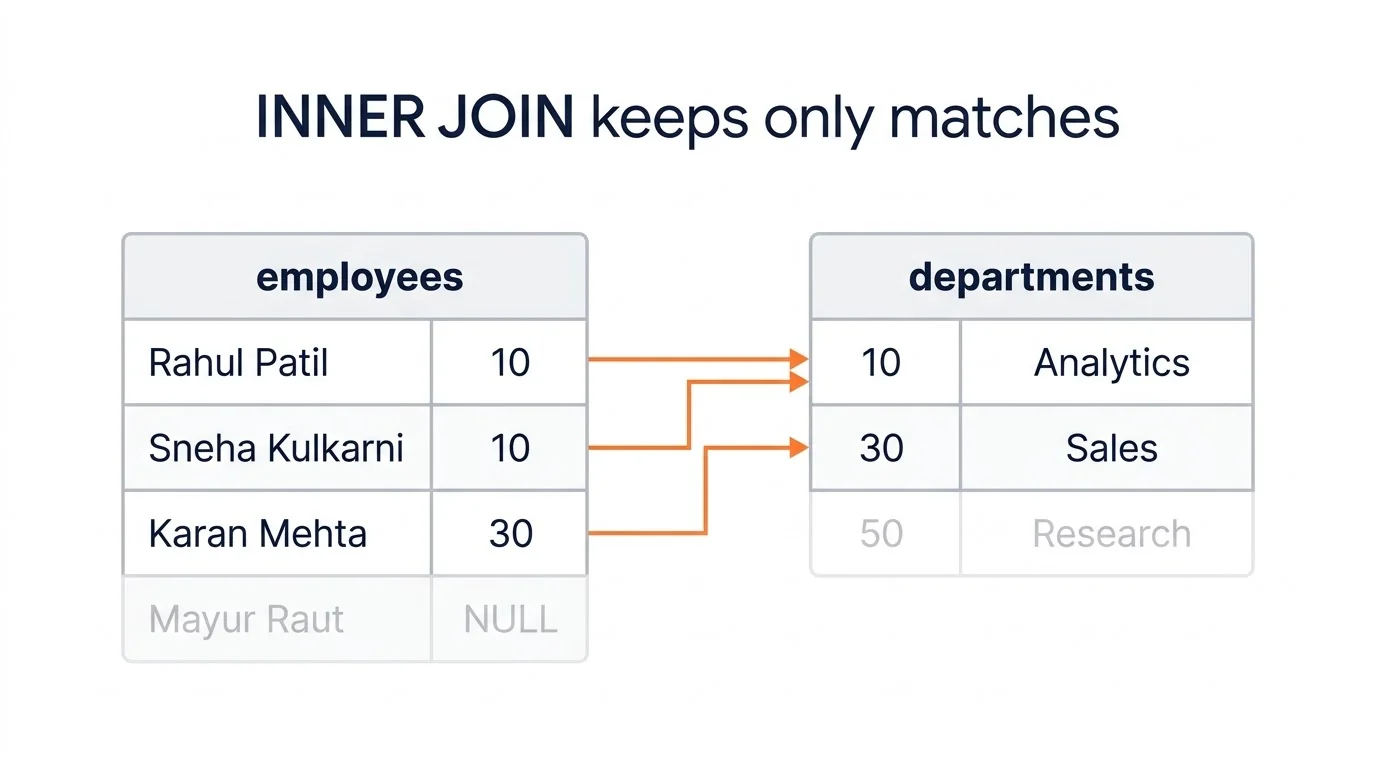 INNER JOIN drops anyone without a partner on the other
side.
Two rows are gone. Mayur has no department, so he has nothing to match. Research has no employees, so it never appears either.
The e and d after the table names are
aliases. They keep column names short and tell the database exactly
which table each column comes from.
Note:
JOINon its own meansINNER JOINin MySQL, PostgreSQL and SQLite. The word INNER is optional.
LEFT JOIN: Keep Every Row From the Left Table
A LEFT JOIN (also called LEFT OUTER JOIN) returns every row from the table named first, plus matching rows from the second table. Where there's no match, the second table's columns come back as NULL.
SELECT e.emp_name, d.dept_name
FROM employees e
LEFT JOIN departments d ON e.dept_id = d.dept_id
ORDER BY e.emp_id;
Result: the same 10 rows as above, plus one more:
| emp_name | dept_name |
|---|---|
| ... | ... |
| Mayur Raut | NULL |
Total: 11 rows. LEFT JOIN is the join analysts use most, because reports usually need "every customer" or "every product", including the ones with zero activity.
Find rows with no match (the anti join)
Add WHERE right_table.column IS NULL to a LEFT JOIN and
you get only the rows that found no partner. This pattern is called an
anti join.
SELECT c.customer_name
FROM customers c
LEFT JOIN orders o ON c.customer_id = o.customer_id
WHERE o.order_id IS NULL;
-- Wardha Textiles
Check a column that can never be NULL in a real match, such as the
primary key o.order_id. Checking a nullable column can give
false positives.
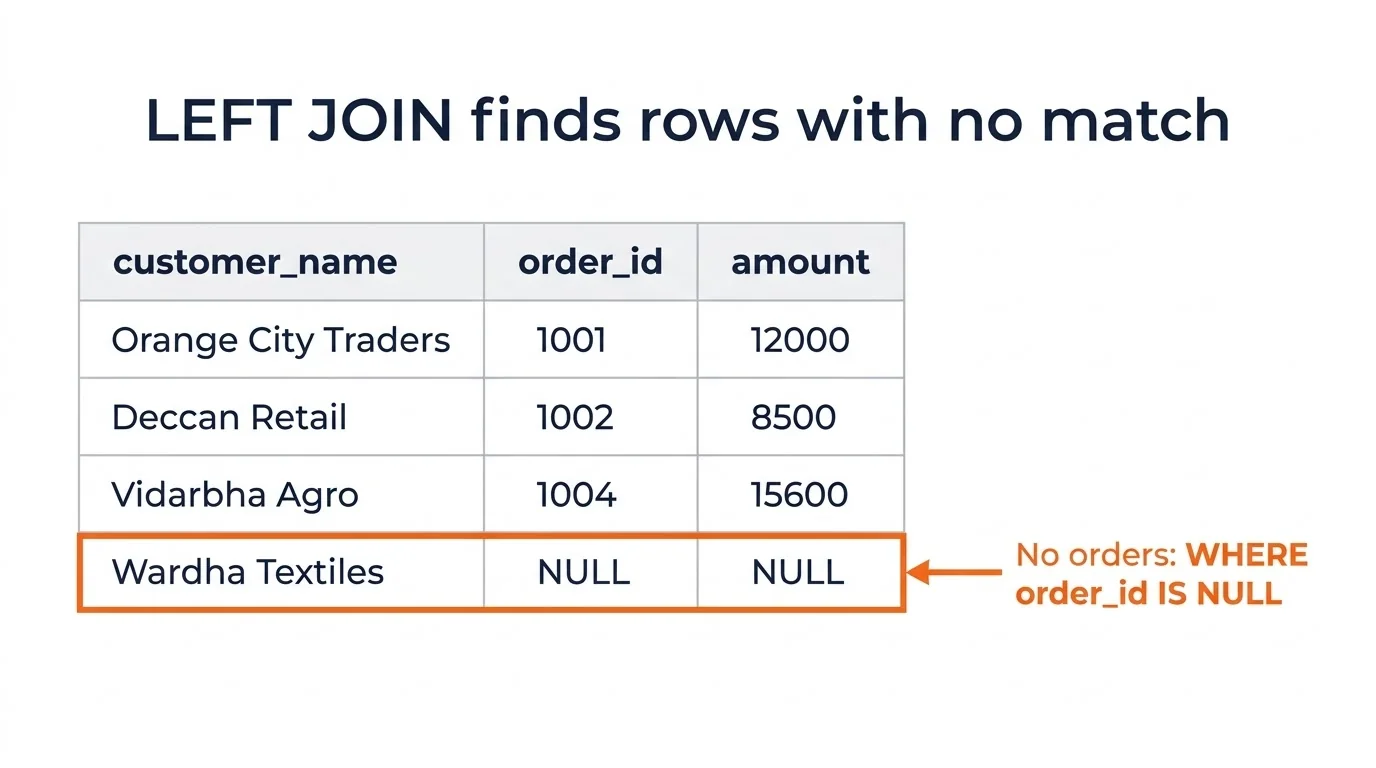 The NULL row is the customer who never ordered.
RIGHT JOIN: The Mirror Image
A RIGHT JOIN returns every row from the second table, plus matches from the first. It's a LEFT JOIN with the tables swapped.
SELECT e.emp_name, d.dept_name
FROM employees e
RIGHT JOIN departments d ON e.dept_id = d.dept_id
ORDER BY d.dept_id, e.emp_id;
-- 11 rows: 10 matches, then NULL | Research
This time Research appears (with a NULL employee) and Mayur is dropped.
Most teams rarely write RIGHT JOIN. The MySQL 8.0
manual itself recommends LEFT JOIN instead of RIGHT JOIN to keep
code portable across databases. Writing
FROM departments d LEFT JOIN employees e gives the same 11
rows and reads in the order people think.
FULL OUTER JOIN and the MySQL Workaround
A FULL OUTER JOIN keeps every row from both tables, matching where it can and filling NULLs where it can't. On our dataset it returns 12 rows: 10 matches, Mayur with no department and Research with no employee.
SELECT e.emp_name, d.dept_name
FROM employees e
FULL OUTER JOIN departments d ON e.dept_id = d.dept_id;
Here's where the three databases split:
| Database | FULL OUTER JOIN result |
|---|---|
| PostgreSQL 16.15 | 12 rows |
| SQLite 3.53.1 | 12 rows (supported since SQLite 3.39.0, June 2022) |
| MySQL 8.0.46 | ERROR 1064: You have an error in your SQL syntax |
MySQL has no FULL OUTER JOIN. The workaround is a LEFT JOIN, plus the unmatched rows from a RIGHT JOIN:
SELECT e.emp_name, d.dept_name
FROM employees e
LEFT JOIN departments d ON e.dept_id = d.dept_id
UNION ALL
SELECT e.emp_name, d.dept_name
FROM employees e
RIGHT JOIN departments d ON e.dept_id = d.dept_id
WHERE e.emp_id IS NULL;
-- 12 rows on MySQL, PostgreSQL and SQLite
Use UNION ALL with the IS NULL filter, not plain UNION.
UNION removes duplicate rows, so if two genuine rows look identical (two
people with the same name in the same department), one silently
vanishes.
Pro tip: We also noticed the databases sort NULLs differently. With
ORDER BY d.dept_id, PostgreSQL put Mayur's NULL department last and SQLite put it first. AddNULLS LAST(PostgreSQL and SQLite) or sort on a CASE expression if row order matters.
CROSS JOIN: Every Possible Combination
A CROSS JOIN pairs every row of one table with every row of the other, producing a Cartesian product. If the tables have N and M rows, the result has N x M rows, as the PostgreSQL documentation on joined tables puts it.
SELECT COUNT(*) AS combos FROM employees CROSS JOIN departments;
-- 55 (11 x 5)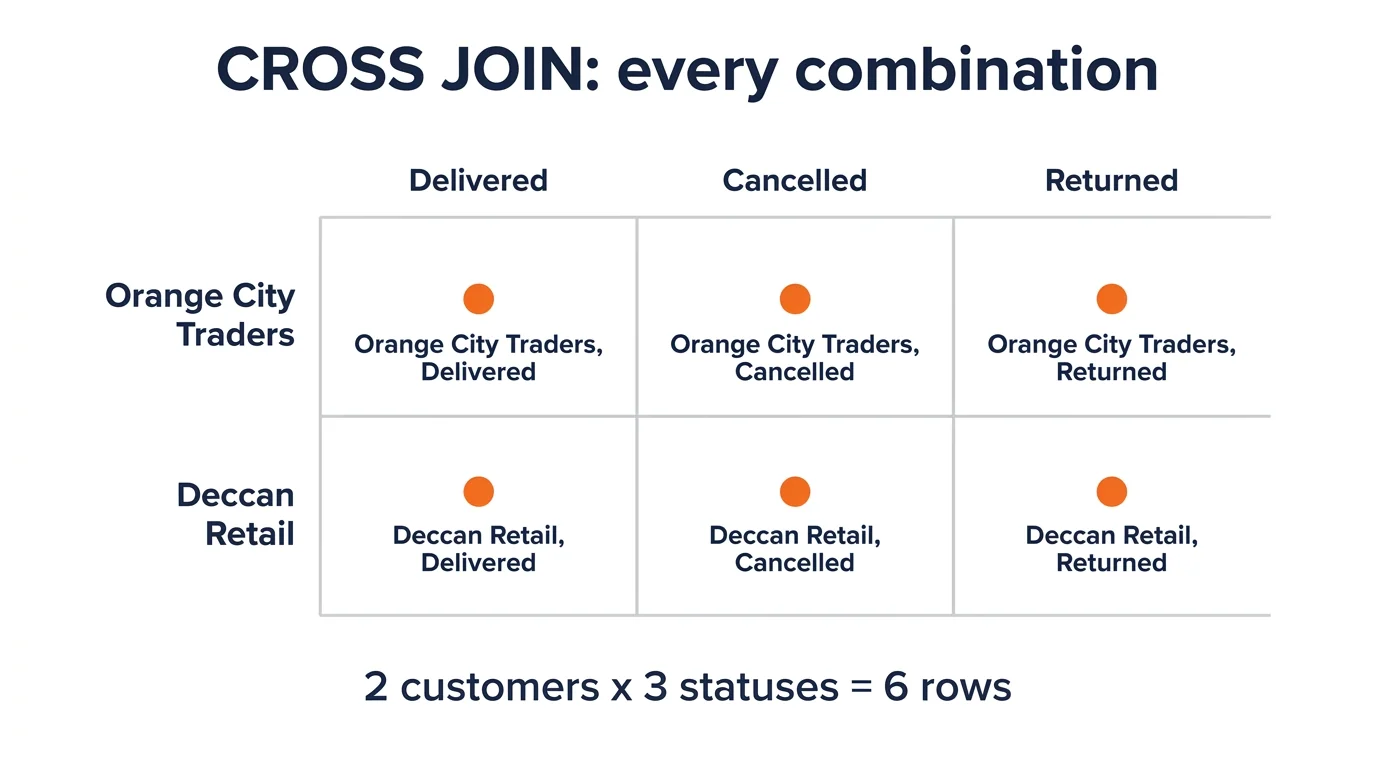 Every row meets every row.
CROSS JOIN is useful when you genuinely need every combination. For example, a report that shows every customer against every order status, so zero counts still appear:
SELECT c.customer_name, s.status
FROM customers c
CROSS JOIN (SELECT 'Delivered' AS status
            UNION ALL SELECT 'Cancelled'
            UNION ALL SELECT 'Returned') s
WHERE c.customer_id IN (101, 102);
-- 6 rows: 2 customers x 3 statuses
The silent cross join: a missing ON
Forget the ON clause and some databases quietly cross join instead of throwing an error. We ran this exact line on all three:
SELECT COUNT(*) FROM orders JOIN customers;| Database | Result |
|---|---|
| MySQL 8.0.46 | 84 rows (14 orders x 6 customers) |
| SQLite 3.53.1 | 84 rows |
| PostgreSQL 16.15 | Syntax error |
The MySQL manual confirms why: in MySQL, JOIN, CROSS JOIN and INNER JOIN are syntactic equivalents, and INNER JOIN without a join condition produces a Cartesian product. On a 10,000-row orders table and a 5,000-row customers table, that typo returns 5 crore rows.
Bottom line: if a join suddenly returns far more rows than the bigger table, check for a missing or wrong ON first.
Self Join: Joining a Table to Itself
A self join joins a table to itself using two different aliases. You
need it when a column points back to the same table, like
manager_id pointing to another emp_id.
SELECT e.emp_name AS employee, m.emp_name AS manager
FROM employees e
LEFT JOIN employees m ON e.manager_id = m.emp_id
ORDER BY e.emp_id;| employee | manager |
|---|---|
| Anita Deshmukh | NULL |
| Rahul Patil | Anita Deshmukh |
| Sneha Kulkarni | Rahul Patil |
| Vikram Joshi | Rahul Patil |
| Pooja Wankhede | Rahul Patil |
| Amit Shinde | Anita Deshmukh |
| Neha Bhosale | Amit Shinde |
| Karan Mehta | Anita Deshmukh |
| Riya Gawande | Karan Mehta |
| Sagar Thakre | Anita Deshmukh |
| Mayur Raut | Rahul Patil |
LEFT JOIN keeps Anita, the top boss, with a NULL manager (11 rows). An INNER self join returns 10 rows and drops her. "Employees who earn more than their manager" is the classic interview version, covered in question 20 of our SQL interview questions guide.
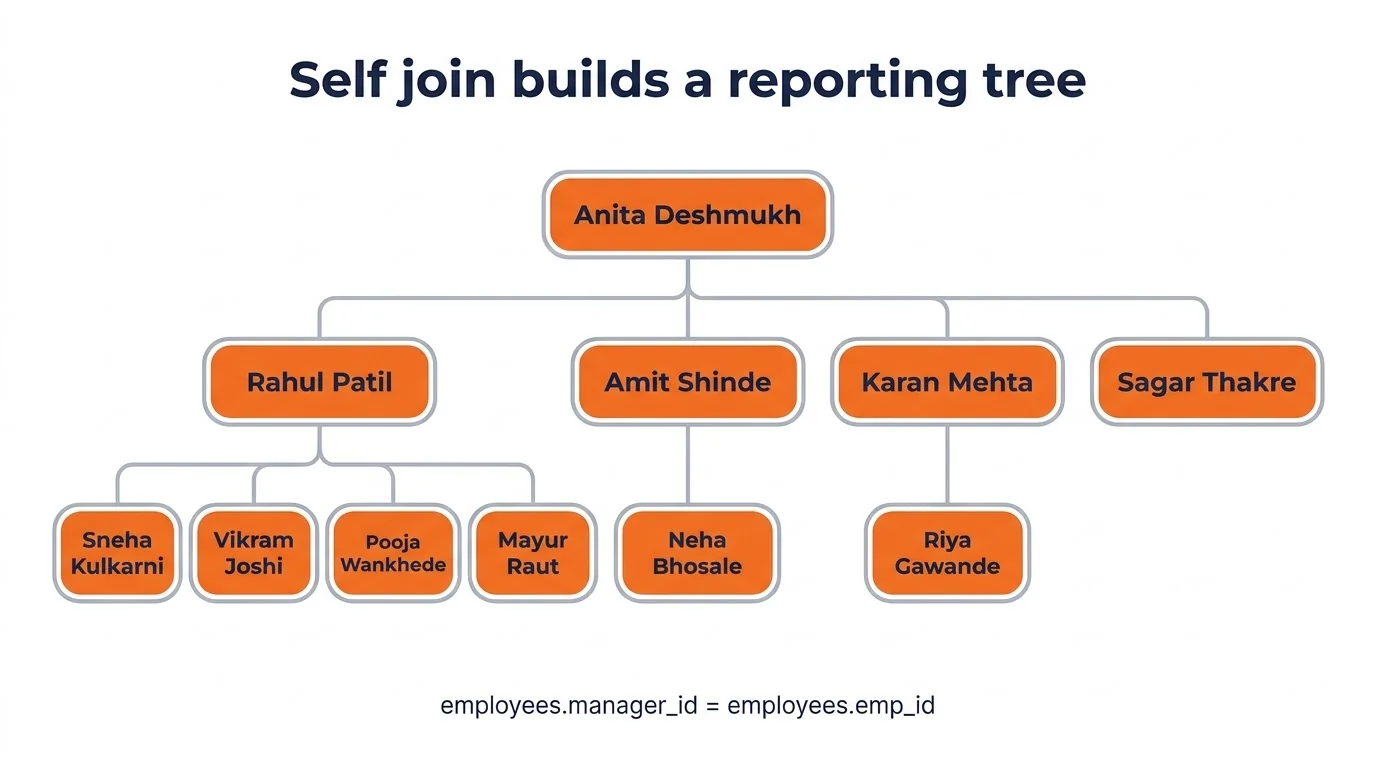 A self join turns a manager_id column into a reporting
tree.
Equi, Non-Equi, NATURAL and USING Joins
Equi, non-equi, NATURAL and USING describe how the join condition is written, not which rows are kept. Each works with INNER, LEFT and the other join types.
Equi join. The condition uses =. Every
join above is an equi join.
Non-equi join. The condition uses <,
>, BETWEEN or similar. A common use is
matching a value to a range:
WITH salary_bands AS (
  SELECT 'Entry' AS band, 0 AS min_sal, 49999 AS max_sal
  UNION ALL SELECT 'Mid', 50000, 99999
  UNION ALL SELECT 'Senior', 100000, 1000000
)
SELECT e.emp_name, e.salary, b.band
FROM employees e
JOIN salary_bands b ON e.salary BETWEEN b.min_sal AND b.max_sal;
-- 10 rows: 3 Senior, 4 Mid, 3 Entry
Sagar Thakre is missing, because NULL is not BETWEEN anything. Use a LEFT JOIN if he should appear with a NULL band.
USING. A shortcut when both tables share the column
name: JOIN departments USING (dept_id). It worked
identically on all three databases.
NATURAL JOIN. Joins on every column with the same name, automatically. That's the danger.
employees NATURAL JOIN departments matches on
dept_id and returns the expected 10 rows. But
customers NATURAL JOIN departments silently matches on
city, and returned 11 rows pairing every Nagpur customer
with three departments.
Nobody asked for that. Avoid NATURAL JOIN in real work; one renamed column can change your results without warning.
How to Join 3 or More Tables in SQL
To join three or more tables in SQL, add one JOIN clause per extra table, each with its own ON condition. The database joins them in a chain, and each new join works on the result so far.
This query uses four table references (two of them self references) to find employees who sit in a different department from their manager:
SELECT e.emp_name, d.dept_name, m.emp_name AS manager, md.dept_name AS manager_dept
FROM employees e
JOIN departments d  ON e.dept_id = d.dept_id
JOIN employees m    ON e.manager_id = m.emp_id
JOIN departments md ON m.dept_id = md.dept_id
WHERE e.dept_id <> m.dept_id;| emp_name | dept_name | manager | manager_dept |
|---|---|---|---|
| Rahul Patil | Analytics | Anita Deshmukh | Engineering |
| Karan Mehta | Sales | Anita Deshmukh | Engineering |
| Sagar Thakre | HR | Anita Deshmukh | Engineering |
Without the WHERE, the chain returns 9 rows, not 11. Mayur drops at the first INNER JOIN (no department) and Anita drops at the second (no manager). In a chain, every INNER JOIN can remove rows, so count rows after each step when a total looks off.
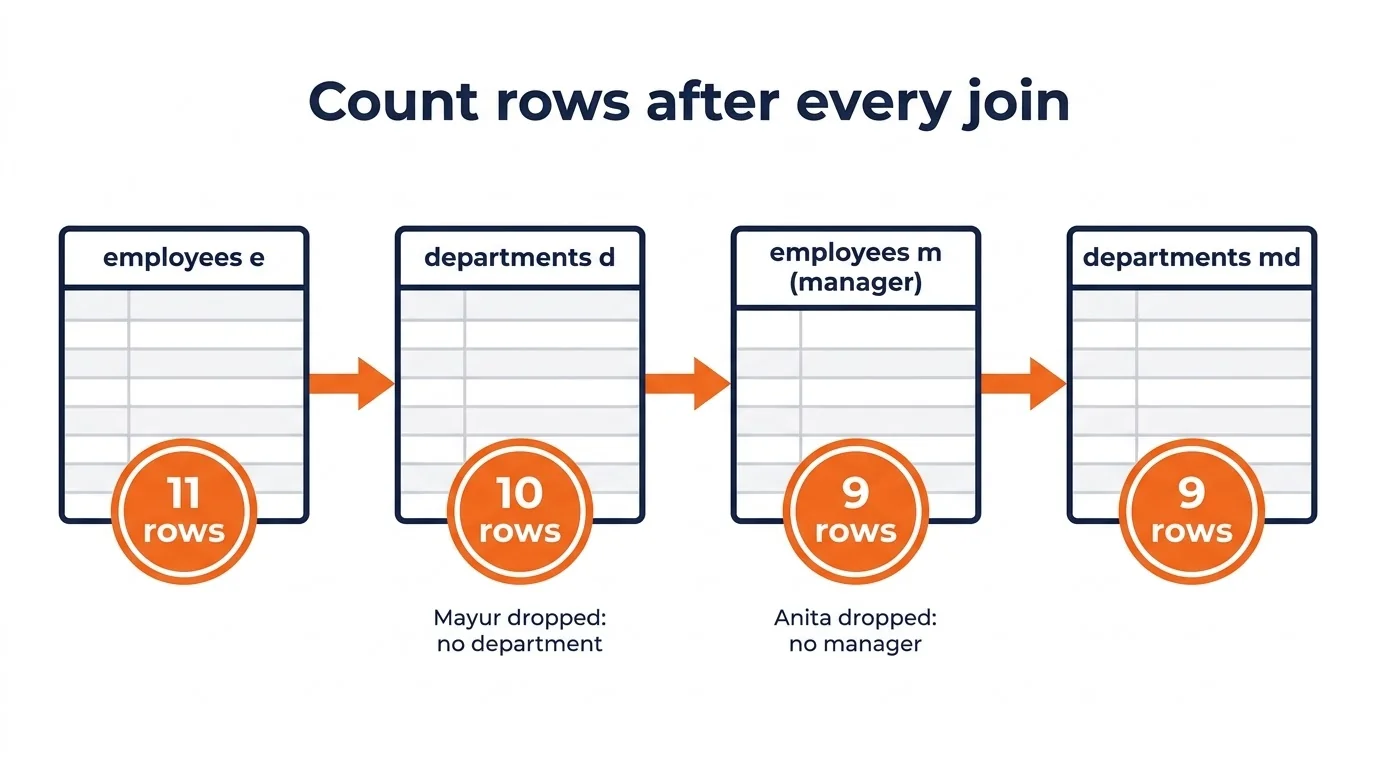 Count rows after each join in the chain.
MySQL allows up to 61 tables in a single join, per its manual. You'll rarely need more than five.
ON vs WHERE: Where Your Filter Goes Changes the Answer
In an INNER JOIN, a filter in ON or WHERE gives the same result. In a LEFT JOIN it doesn't: a WHERE condition on the right-hand table removes the NULL rows and turns your LEFT JOIN into an INNER JOIN.
Say the task is "count delivered orders for every customer, including those with zero".
Filter in WHERE (wrong):
SELECT c.customer_name, COUNT(o.order_id) AS delivered_orders
FROM customers c
LEFT JOIN orders o ON c.customer_id = o.customer_id
WHERE o.status = 'Delivered'
GROUP BY c.customer_id, c.customer_name;
-- 4 rows
Filter in ON (right):
SELECT c.customer_name, COUNT(o.order_id) AS delivered_orders
FROM customers c
LEFT JOIN orders o
  ON c.customer_id = o.customer_id AND o.status = 'Delivered'
GROUP BY c.customer_id, c.customer_name;
-- 6 rows| customer_name | WHERE version | ON version |
|---|---|---|
| Orange City Traders | 4 | 4 |
| Deccan Retail | 4 | 4 |
| Vidarbha Agro | 2 | 2 |
| Konkan Foods | 2 | 2 |
| Sitabuldi Mobiles | missing | 0 |
| Wardha Textiles | missing | 0 |
The WHERE version runs without an error and looks fine. It just quietly deletes the two customers your manager most wanted to see.
Notice COUNT(o.order_id), not COUNT(*). In
a separate test, COUNT(*) after a LEFT JOIN gave the empty
Research department a headcount of 1, because the LEFT JOIN still
produces one (NULL-filled) row for it.
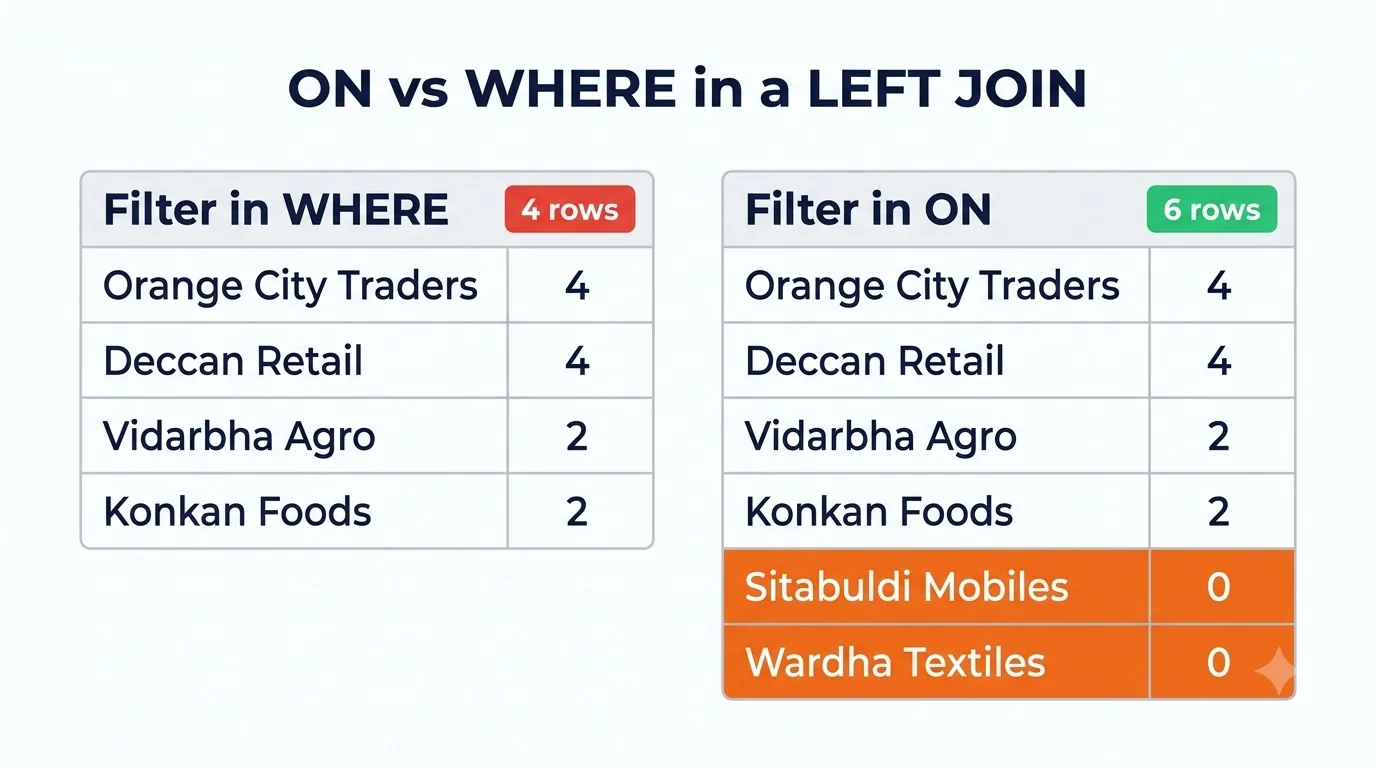 Same filter, different clause, two customers lost.
Why Joins in SQL Return Duplicate Rows
Joins in SQL return "duplicate" rows when the join key isn't unique on one side. Each row on the left is repeated once for every match on the right, which is called fan-out.
Sometimes that's correct. customers INNER JOIN orders
returns 14 rows, one per order, so Orange City Traders appears five
times. If you only wanted "customers who ordered", use EXISTS, which
returned the 5 distinct customers:
SELECT c.customer_name
FROM customers c
WHERE EXISTS (SELECT 1 FROM orders o WHERE o.customer_id = c.customer_id);
The dangerous case is joining on a column that isn't a key at all. Here's a realistic mistake: "total delivered revenue from customers in cities where we have an office".
-- Wrong: joins on city, which repeats in departments
SELECT SUM(o.amount) AS revenue
FROM orders o
JOIN customers c   ON o.customer_id = c.customer_id
JOIN departments d ON c.city = d.city
WHERE o.status = 'Delivered';
-- 2,90,000
-- Right: filter by city without multiplying rows
SELECT SUM(o.amount) AS revenue
FROM orders o
JOIN customers c ON o.customer_id = c.customer_id
WHERE o.status = 'Delivered'
AND c.city IN (SELECT city FROM departments);
-- 1,06,900The wrong query is 2.7 times too high. Nagpur has three departments, so every Nagpur order was counted three times, and Pune orders twice. It's more than our total delivered revenue for the whole period (₹1,23,900), which is the giveaway, if you think to check.
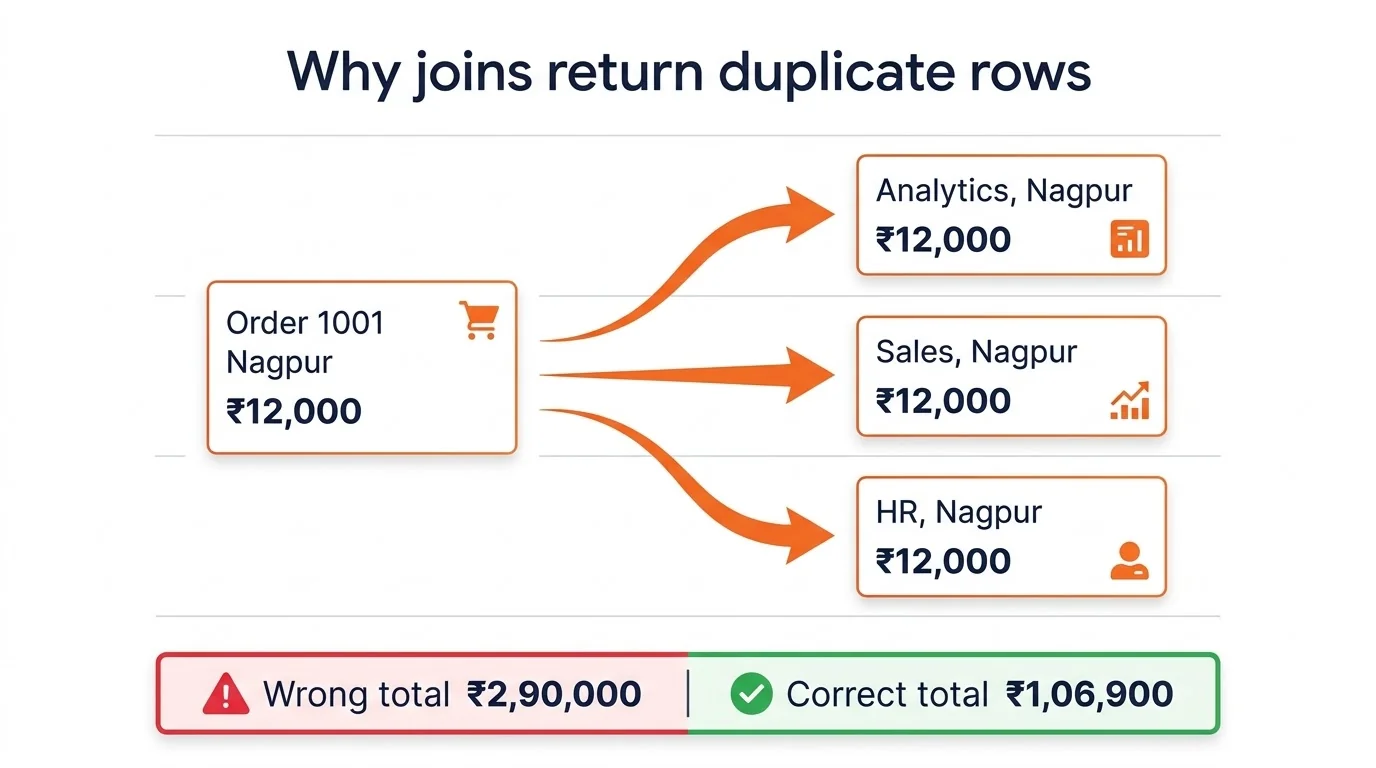 One order, three office rows, triple the revenue.
NULL keys never match
NULL means "unknown", so NULL = NULL is not true and a
NULL key never joins to anything. We joined employees to themselves on
dept_id and got 30 pairs (4x4 + 3x3 + 2x2 + 1x1). Mayur,
with a NULL dept_id, didn't even match himself.
If NULL keys should count as a group, replace them first with
COALESCE(dept_id, -1) on both sides, or handle them in a
separate step.
The ROW Check: 3 Questions Before You Write Any Join
The ROW Check is a 3-question habit we use to pick the right join and catch silent errors before they reach a report: Rows to keep, One-to-many, Where the filter goes. It takes under a minute and prevents every bug in the last three sections.
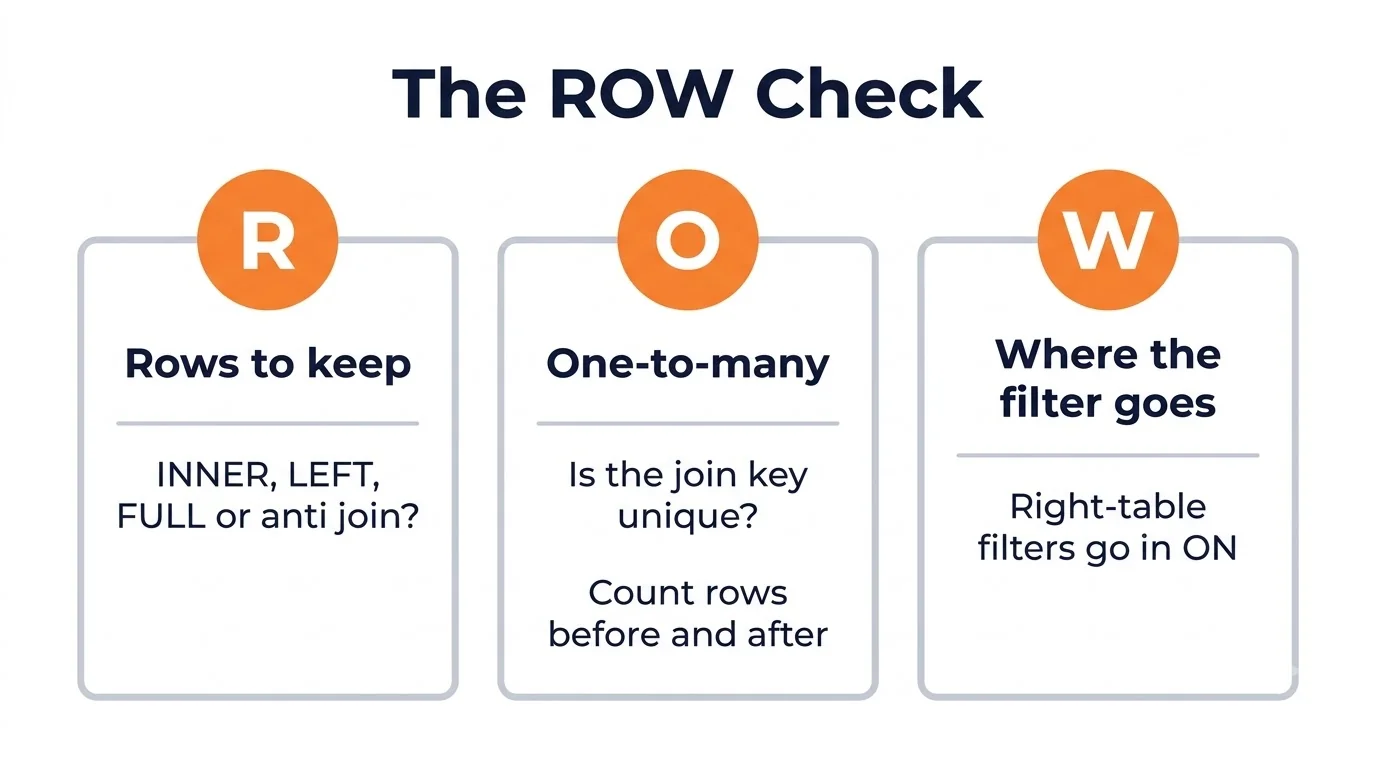 Ask these three before you type JOIN.
- Rows to keep. Do I need only matches (INNER), all of one table (LEFT), all of both (FULL), or only the non-matches (anti join)? Say it in plain English first: "every customer, even with zero orders" means LEFT JOIN from customers.
- One-to-many. Is the join column unique on the other
side? If not, expect more rows than you started with. Before
aggregating, run
SELECT COUNT(*)before and after the join. If the count grew and you didn't expect it, you have fan-out. - Where the filter goes. For conditions on the optional (right-hand) table of a LEFT JOIN, put them in ON. Put conditions on the preserved table, or final filters, in WHERE.
Here's the ROW Check applied to "revenue from customers in office
cities". Rows to keep: only delivered orders from those customers.
One-to-many: departments.city repeats, so joining on it
will multiply orders.
The fix follows directly: filter with IN or EXISTS instead of a join.
Which Joins in SQL Are Fastest? We Tested 1 Million Rows
On well-indexed tables, the join type matters less than how you write the condition. In our test, NOT EXISTS and LEFT JOIN ... IS NULL were equally fast on PostgreSQL and MySQL, while NOT IN collapsed on PostgreSQL.
Setup: 100,000 customers and 1,000,000 orders (10,000 customers with no orders), PostgreSQL 16.15 and MySQL 8.0.46 with default settings, a 2-vCPU cloud container, best of three runs, 18 November 2026. Your timings will differ; the gaps are what matter.
| Query | PostgreSQL, no index | PostgreSQL, index | MySQL, no index | MySQL, index |
|---|---|---|---|---|
| LEFT JOIN + IS NULL | 116 ms | 107 ms | 288 ms | 224 ms |
| NOT EXISTS | 106 ms | 99 ms | 268 ms | 220 ms |
| NOT IN (subquery) | Over 60 s (cancelled) | Over 60 s (cancelled) | 282 ms | 216 ms |
| INNER JOIN + SUM for 1,000 customers | 43 ms | 45 ms | 173 ms | 26 ms |
What we learned:
- NOT IN is the trap on PostgreSQL. Running EXPLAIN showed a plain subplan that re-scanned a materialised list of 1 million order rows for each customer. The PostgreSQL wiki's "Don't Do This" page warns about exactly this: the planner can't turn NOT IN (SELECT ...) into an anti join. NOT IN also returns zero rows if the subquery contains a single NULL.
- MySQL 8.0 handled all three anti-join styles the same way, around 0.2 to 0.3 seconds.
- An index on the join column helped MySQL most. The
INNER JOIN with SUM went from 173 ms to 26 ms (about 6.7 times faster)
after
CREATE INDEX idx_b_orders_cust ON b_orders(customer_id). PostgreSQL chose a hash join either way, so the index barely changed its time.
Rule of thumb: index foreign key columns you join on, prefer NOT
EXISTS or LEFT JOIN ... IS NULL over NOT IN, and run
EXPLAIN on any join that feels slow.
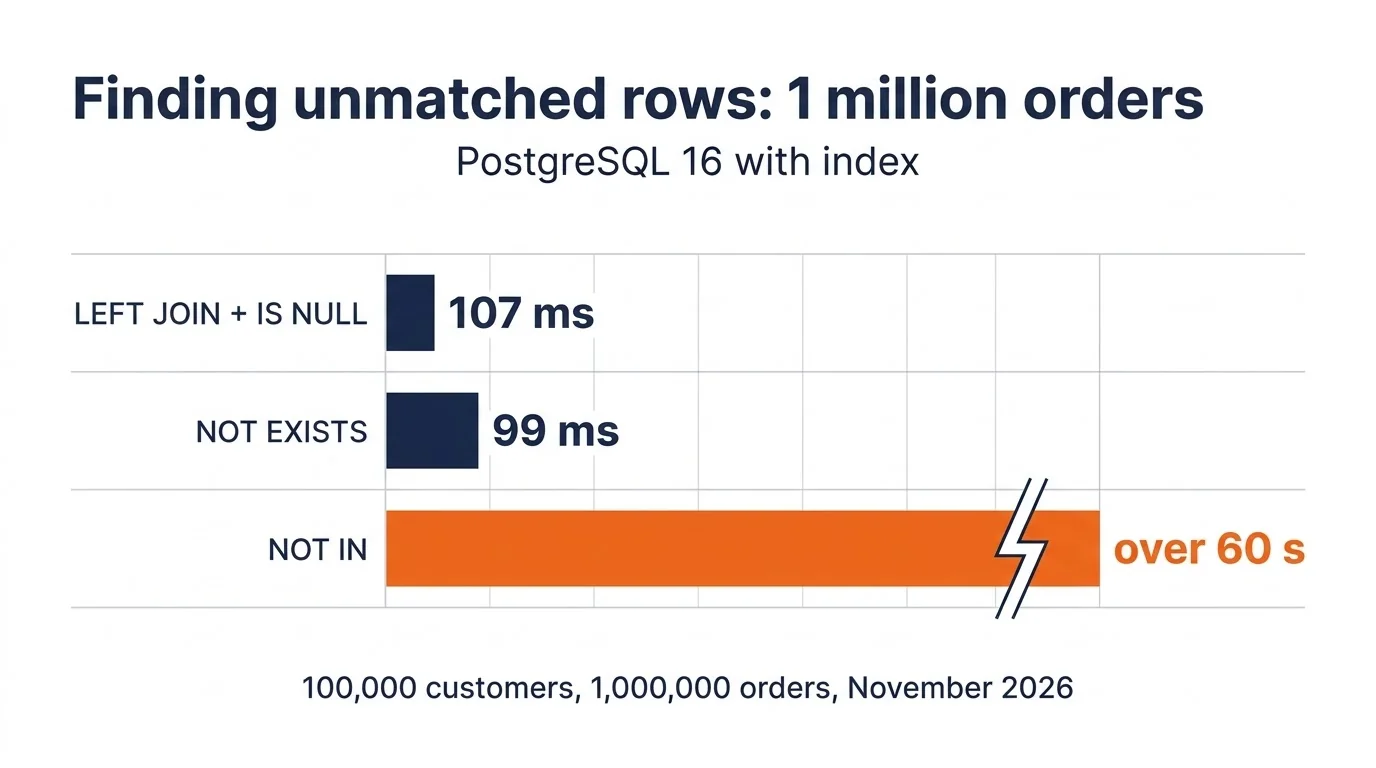 Same answer, very different wait.
SQL Joins for Excel and Power BI Users
If you already use Excel or Power BI, you've been doing joins under a different name. A VLOOKUP is close to a LEFT JOIN, and Power BI's Merge Queries offers the same join kinds as SQL.
| What you know | SQL equivalent | The catch |
|---|---|---|
| VLOOKUP / XLOOKUP with exact match | LEFT JOIN | VLOOKUP returns the first match if duplicates exist; a LEFT JOIN returns every match, so rows can multiply |
| #N/A from VLOOKUP | NULL from LEFT JOIN | Filter IS NULL to list the misses |
| Power Query: Left outer | LEFT JOIN | Same behaviour |
| Power Query: Right outer / Full outer | RIGHT JOIN / FULL OUTER JOIN | Power Query offers Full outer even if your source is MySQL |
| Power Query: Inner | INNER JOIN | Same behaviour |
| Power Query: Left anti / Right anti | LEFT JOIN + IS NULL, or NOT EXISTS | SQL has no ANTI keyword |
Microsoft's Power Query documentation lists those six join kinds: Left outer, Right outer, Full outer, Inner, Left anti and Right anti.
That first row is why analysts moving from Excel often get inflated totals in SQL. Their VLOOKUP never showed the second matching row; the join does.
If you're building reports, the same logic applies inside our Power BI dashboard tutorial, where a wrong relationship causes the same fan-out.
Practice Questions on Joins in SQL
Try these on the practice dataset before reading the answers. Each has one correct row count, so you'll know immediately if your join is right.
| # | Task | Expected result |
|---|---|---|
| 1 | List every department with its employee count, including empty ones | 5 rows, Research = 0 |
| 2 | Find employees who have no department | 1 row: Mayur Raut |
| 3 | Show every customer with total delivered revenue, zero if none | 6 rows, Orange City Traders = 42,200 |
| 4 | Find employees who earn more than their manager | 1 row: Neha Bhosale |
| 5 | List every employee and department, matched or not, on MySQL | 12 rows |
Hints: question 1 needs COUNT(e.emp_id), question 3
needs the status filter in ON plus
COALESCE(SUM(o.amount), 0), and question 5 needs the UNION
ALL workaround. The answer queries are in fireblaze_sql_practice_answers.sql.
Want more? Our data analyst interview questions guide has joins mixed with Excel and Power BI questions, the way real analyst rounds work.
Now It's Your Turn
You've now seen every major type of join in SQL run on real data, in three databases, including the places where they quietly return the wrong answer.
The quickest way to lock it in: download the dataset, run the ON vs WHERE pair and the fan-out pair yourself, and watch the counts change. Then apply the ROW Check to the next join you write at work.
If you'd like a trainer to walk you through joins, subqueries and window functions on live projects, the SQL course in Nagpur covers them end to end, and the data analyst course in Nagpur pairs joins in SQL with Excel and Power BI. Not sure which fits? Book a free career counselling session.
FAQ
What are joins in SQL?
Joins in SQL combine rows from two or more tables based on a related column, usually a primary key and a foreign key. The main types are INNER JOIN, LEFT JOIN, RIGHT JOIN, FULL OUTER JOIN, CROSS JOIN and the self join. They differ in what happens to rows that have no match in the other table.
What is the difference between INNER JOIN and LEFT JOIN?
INNER JOIN returns only rows that match in both tables. LEFT JOIN returns every row from the left table and fills the right table's columns with NULL where there's no match. On our practice dataset, INNER JOIN returned 10 employees and LEFT JOIN returned 11, adding the employee with no department.
Does MySQL support FULL OUTER JOIN?
No, MySQL 8.0 returns error 1064 for FULL OUTER JOIN. Combine a LEFT
JOIN with the unmatched rows of a RIGHT JOIN using UNION ALL and a
WHERE left_table.key IS NULL filter. PostgreSQL supports
FULL OUTER JOIN, and SQLite has supported it since version 3.39.0 in
June 2022.
Is JOIN the same as INNER JOIN?
Yes, in MySQL, PostgreSQL, SQLite and SQL Server, writing JOIN without a type means INNER JOIN. Be careful in MySQL and SQLite, though: a JOIN without an ON clause runs as a CROSS JOIN instead of throwing an error.
Why does my SQL join return duplicate rows?
A join returns extra rows when the join column isn't unique on one side, so each row repeats once per match. Check whether you joined on a real key, count rows before and after the join, and use EXISTS or aggregate the many side first if you only need one row per entity.
What is the difference between JOIN and UNION?
A JOIN combines tables side by side, adding columns from matching rows. UNION stacks result sets on top of each other, adding rows, and needs the same number of columns in each query. UNION removes duplicate rows; UNION ALL keeps them.
Sources
- MySQL 8.0 Reference Manual, JOIN Clause, current
- PostgreSQL Documentation, 7.2 Table Expressions: Joined Tables, current
- SQLite Release 3.39.0 notes, 2022
- PostgreSQL Wiki, Don't Do This: Don't use NOT IN, current
- Microsoft Learn, Power Query merge queries overview, current
- Exceljet, VLOOKUP function, current
- Fireblaze SQL practice dataset for joins in SQL and 1-million-row benchmark, run on SQLite 3.53.1, PostgreSQL 16.15 and MySQL 8.0.46, 18 November 2026