 Fireblaze
 Learning Guides
Excel vs Tableau: A Comparative Guide for Data Analysis
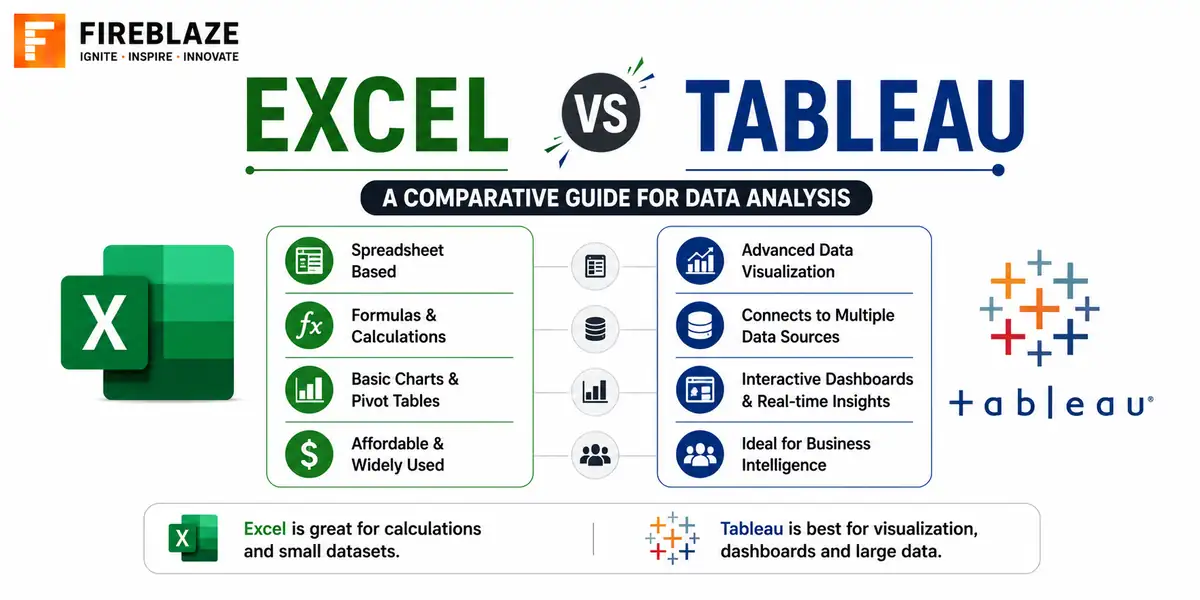
Quick answer: Compare Excel and Tableau for data analysis and visualisation, covering their strengths, weaknesses, and which tool fits which kind of task.
Two Tools with Different Core Strengths
Excel and Tableau are both widely used in analytics, but they are built for different primary purposes. Excel is a general-purpose spreadsheet tool with strong calculation and quick reporting capabilities. Tableau is a specialised data visualisation tool built for building interactive dashboards on larger, more complex datasets.
Data Handling Capacity
Excel can become noticeably slow and unwieldy once a dataset grows into the hundreds of thousands of rows. Tableau is designed to handle much larger datasets efficiently, and can connect directly to live databases rather than requiring data to be manually loaded into the tool itself.
Visualisation Capabilities
Excel offers standard chart types, sufficient for straightforward reporting. Tableau provides far more sophisticated, interactive visualisations, with drill-downs, filters and dashboards that update dynamically as users interact with them, which Excel cannot easily replicate.
Ease of Use and Learning Curve
Excel is nearly universally familiar and has a gentle learning curve for basic tasks. Tableau has a steeper initial learning curve but rewards that investment with far more powerful and interactive dashboards once mastered.
Formulas and Calculations
Excel: =SUMIFS(Sales, Region, "North", Month, "January")
Tableau: Calculated fields using a similar but distinct formula syntax
Both support custom calculations, but Excel's formula language is generally more familiar to a broader range of business users.
Collaboration and Sharing
Modern Excel, through Office 365, supports real-time collaborative editing. Tableau is built specifically for sharing interactive dashboards broadly across an organisation through Tableau Server or Tableau Public, which is closer to its core purpose than Excel's file-sharing model.
Cost Considerations
Excel is often already available as part of an existing Microsoft Office license. Tableau requires a separate, typically more significant, licensing cost, though free options like Tableau Public exist for public, non-confidential data.
When to Use Each Tool
| Use Excel when | Use Tableau when |
|---|---|
| Data is small to moderate in size | Data is large or needs a live database connection |
| You need quick, one-off calculations | You need an interactive, shareable dashboard |
| The audience is comfortable with spreadsheets | The audience needs to explore data themselves via filters |
Common Interview Questions
When would you choose Tableau over Excel for a reporting task?
When the dataset is large, needs a live database connection, or when the audience needs an interactive dashboard they can filter and explore themselves rather than a static report.
Is Tableau a replacement for Excel?
Not entirely. Many analysts use both together, doing quick calculations and data cleaning in Excel before building the final interactive dashboard in Tableau.
FAQ
Frequently Asked Questions
What is the main difference between Excel and Tableau?
Excel is a general-purpose spreadsheet tool strong at calculations and quick reporting. Tableau is a specialised visualisation tool built for interactive dashboards on larger, more complex datasets.
Can Tableau connect directly to a live database?
Yes, unlike Excel which typically requires data to be manually loaded or imported, Tableau can connect directly to live databases and update as the underlying data changes.
Is Tableau harder to learn than Excel?
Generally yes, Tableau has a steeper initial learning curve, but it rewards that investment with far more powerful, interactive dashboards than Excel can produce.
Should you learn Excel or Tableau first for a data analytics career?
Excel first, since it is foundational and used almost everywhere. Tableau is a valuable addition once you need to build interactive dashboards on larger datasets.
If you are starting with Excel, our self-paced Excel for Data Analytics course covers cleaning, XLOOKUP, PivotTables, Power Query and dashboards, with a graded project.
Keep Reading
Related Articles
Learning Guides
INNER JOIN in SQL with Examples: Complete Beginner's Guide
Learn INNER JOIN in SQL with practical examples, syntax, interview questions, and real-world use cases. A complete beginner-friendly SQL JOI
Learning Guides
OUTER JOIN in SQL: Complete Guide with Examples for Beginners
Master OUTER JOIN in SQL with practical examples and real-world scenarios. Learn LEFT JOIN, RIGHT JOIN, FULL OUTER JOIN, syntax, use cases,
Learning Guides
Multi-Row Functions in SQL: Complete Guide with Examples
Learn multi-row (aggregate) functions in SQL including SUM, AVG, COUNT, MIN, MAX, GROUP BY and HAVING, with practical examples, NULL handlin