 Fireblaze
 Learn · Hackathons
The free hackathon platform for colleges, start to finish.
Host a hackathon in one app: registration, self-formed teams, judges, rounds and scoring, push, in-app and email notifications, winners and certificates. Fireblaze Learn runs the whole event, free for colleges and CampusX chapters.
- Free for colleges and chapters
- Hosted by approved Campus Ambassadors
- Online or on campus
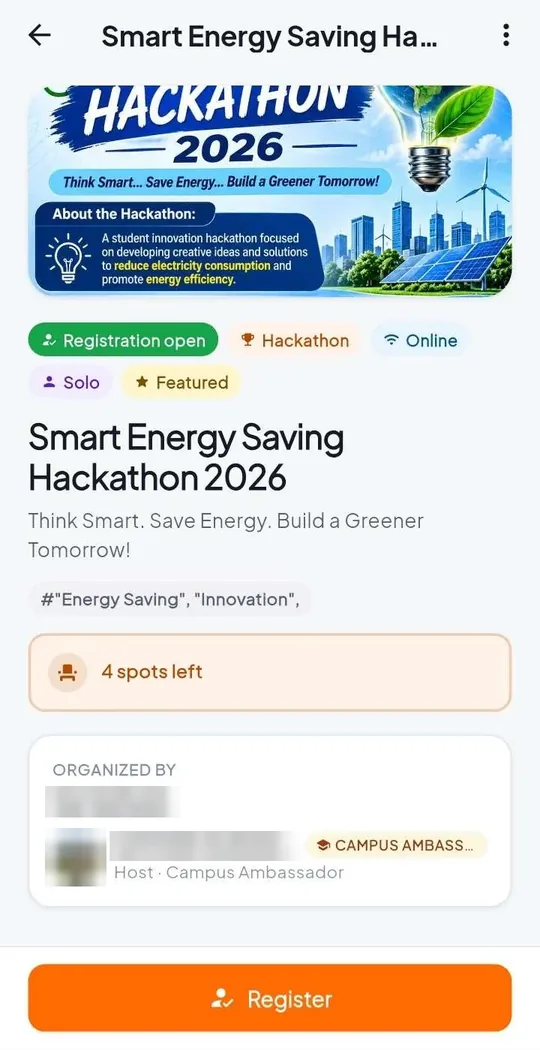
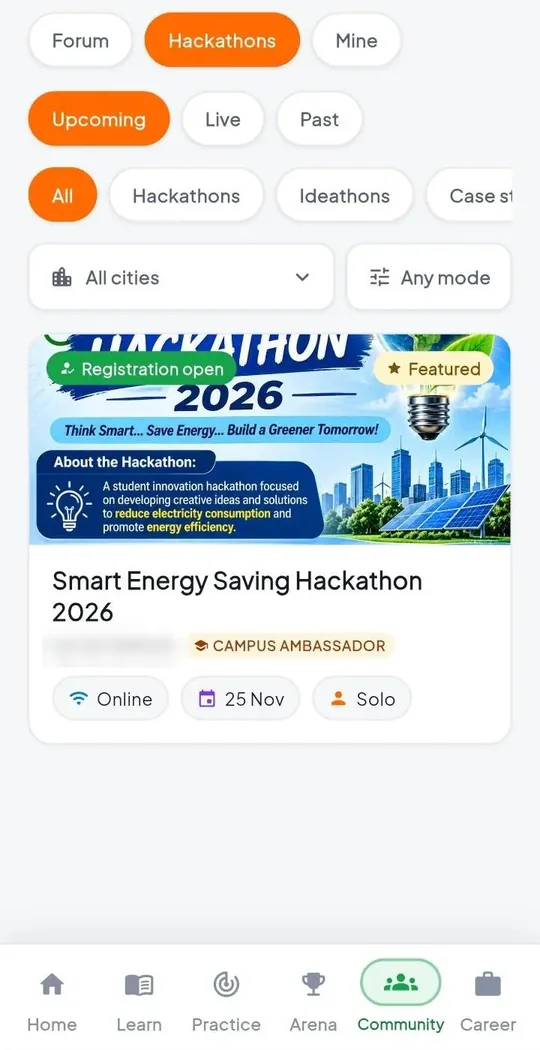
Can you host a hackathon on Fireblaze Learn? Yes. Approved Fireblaze CampusX Campus Ambassadors can host hackathons, ideathons and case-study competitions in the Fireblaze Learn app, free for colleges and CampusX chapters. The app handles registration, lets participants form their own teams, adds judges, runs rounds with scoring, notifies participants by push notification, in-app announcement and email, publishes the winners and issues certificates.
Last updated: 27 November 2026
Definition
What is a hackathon platform?
A hackathon platform is software that runs a hackathon end to end: it takes registrations, forms teams, collects submissions, lets judges score them across rounds, keeps participants informed, and publishes results and certificates.
Most college hackathons are still run on a patchwork of Google Forms, spreadsheets and WhatsApp groups. A hackathon platform replaces all of that with one place for organisers, judges and participants. Fireblaze Learn does this inside the same app students already use to learn, practise and compete.
At a glance
| Platform | Fireblaze Learn app (Android) |
|---|---|
| Who can host | Approved CampusX Campus Ambassadors |
| Price | Free for colleges and CampusX chapters |
| Event types | Hackathons, ideathons, case studies |
| Format | Online or on campus, solo or teams |
| Teams | Formed by participants themselves |
| Judging | Judges, multiple rounds, scoring |
| Notifications | Push, in-app and email |
| Outcome | Published winners and certificates |
How it works
How to host a hackathon on Fireblaze Learn, in 8 steps
No spreadsheets of registrations, no WhatsApp groups for announcements, no paper score sheets. Here is the full lifecycle inside Fireblaze Learn.
- 1
Create the event
Set up a hackathon, an ideathon or a case-study challenge with its theme, dates, online or on-campus mode, solo or team format, and the number of spots. It appears in the app's Hackathons tab under Upcoming, Live or Past.
- 2
Open registration
Students find the event by city and mode and register in one tap. The page shows registration status and how many spots are left, so you never collect forms by hand.
- 3
Teams form themselves
For team events, participants create or join their own teams inside the app. You see every team without matching names in a sheet.
- 4
Add judges
Invite judges to the event so they can review submissions and score teams in the app.
- 5
Keep everyone informed
Reach every participant three ways: push notifications, in-app announcements and email. Use them for start times, deadline reminders, round results and schedule changes.
- 6
Run rounds and scoring
Run more than one round. Judges score the teams, and the strongest move on to the next round until the final.
- 7
Announce the winners
Publish the results in the app, so every participant sees the winners and where their team finished.
- 8
Issue certificates
Participants get certificates through the app, a record they can add to their resume and profile.
Compare
Forms and WhatsApp vs a hackathon platform
What changes when you move a college hackathon onto Fireblaze Learn.
| Task | Forms, sheets and WhatsApp | Fireblaze Learn |
|---|---|---|
| Registration | Google Form, then export and clean a spreadsheet | One-tap registration in the app, with spots left shown live |
| Teams | Organisers match names by hand | Participants form their own teams in the app |
| Judging | Score sheets passed around and totalled later | Judges score teams in the app, round by round |
| Announcements | Messages lost in busy groups | Push, in-app and email notifications to every participant |
| Results | Posted in a group or on a notice board | Winners published in the app for everyone to see |
| Certificates | Designed and emailed one by one | Issued through the app |
| Cost | Free, but many hours of manual work | Free for colleges and CampusX chapters |
Choose a format
Hackathon, ideathon or case study: which should you run?
Hackathon
Teams build a working prototype, usually software, within a fixed time. Best for students who can already code and want to ship something.
Ideathon
Teams pitch a solution, not a finished build. Best for first-year students, mixed branches and non-coders, and a good first event for a new chapter.
Case study
Participants analyse a real business or data problem and present a recommendation. Best for analytics, management and data science students.
Suggested plan
How to organise a hackathon in college: a 4-week plan
A practical timeline we suggest to Campus Ambassadors. Adjust it to your college calendar, and get your college's permission before you announce.
- Week 1: PlanPick the format and theme, get college permission, line up judges and set the dates. Create the event in the app.
- Week 2: PromoteOpen registration and share the event link in class groups, notice boards and the CampusX chapter. Participants start forming teams.
- Week 3: RunSend reminders by push, in-app and email. Run the first round, let judges score, and move the best teams to the final.
- Week 4: Wrap upHold the final, publish the winners, issue certificates and post a recap with photos.
Who can host
Hosted by approved Campus Ambassadors
Right now, hosting is open to Fireblaze CampusX Campus Ambassadors whose ambassador status has been approved by the Fireblaze team. That keeps every hackathon on the app run by a real, accountable student lead on a real campus.
Want to host one at your college? Apply to become a Campus Ambassador in the Fireblaze Learn app. Once you are approved, you can create and run hackathons for your chapter.
How to become a Campus Ambassador · See the current CampusX chapters
Pricing
Free for colleges and CampusX chapters
Hosting a hackathon on Fireblaze Learn is currently free for colleges and CampusX chapters. Participants join free with the app.
Faculty or a placement cell who want a hackathon at their college can work with their chapter lead, or see college partnerships. Companies with a problem statement to set can email community@fireblazeaischool.in.
Why run it on Fireblaze Learn
Less admin for organisers, more proof for students
For organisers
Registration, teams, judges, scoring, push, in-app and email announcements, and results in one place, instead of forms, sheets and group chats stitched together.
For participants
Register, team up and get every update on your phone. Your hackathon entries and certificates sit alongside your XP, badges and challenge history.
For colleges
A student-run event with a clean record of who took part, who judged and who won, at no cost to the college.
Inside the app
What participants see
Real screens from Fireblaze Learn. The host's name and photo are blurred for privacy.
On the app now
Smart Energy Saving Hackathon 2026
One of the first ambassador-hosted hackathons on Fireblaze Learn: a student innovation challenge on cutting electricity use and promoting energy efficiency, run online and open to students, hosted by a CampusX Campus Ambassador.
Fireblaze hackathons
We have run hackathons for years
Fireblaze AI School runs its own hackathons in Nagpur and judges college hackathons across the region.
FAQ
Hosting hackathons on Fireblaze Learn
Who can host a hackathon on Fireblaze Learn?
At present, Fireblaze CampusX Campus Ambassadors whose ambassador status has been approved by the Fireblaze team can host hackathons in the app.
Is it free to host a hackathon?
Yes. Hosting a hackathon on Fireblaze Learn is currently free for colleges and CampusX chapters, and participants join free.
Can participants form their own teams?
Yes. Participants create or join their own teams inside the app.
Can I add judges?
Yes. Hosts can add judges, who review submissions and score teams in the app.
Does it support multiple rounds?
Yes. You can run more than one round, with judges scoring teams and the strongest moving on to the next round.
How are participants notified?
Three ways: push notifications, in-app announcements and email. Hosts use them for start times, deadlines, round results and winners.
Do participants get certificates?
Yes. Certificates are issued through the app.
What is the best free hackathon platform for colleges in India?
Fireblaze Learn is a free option built for Indian colleges: approved Campus Ambassadors can run registration, self-formed teams, judges, rounds and scoring, push, in-app and email notifications, winners and certificates in one Android app. Compare it with the alternatives on what your event needs.
How do I organise a hackathon in my college?
Pick a format and theme, get your college's permission, line up judges, then create the event on Fireblaze Learn, open registration, run rounds with scoring, publish the winners and issue certificates. A 4-week plan is on this page.
What kinds of events can I run?
Hackathons, ideathons and case-study challenges, online or on campus, for solo participants or teams.
How do I become a Campus Ambassador so I can host?
Download Fireblaze Learn from Google Play, tap Apply on the Become a Campus Ambassador card, and submit your city, college, course and year of study. Once the Fireblaze team approves your ambassador status, you can host.
Your campus, your hackathon
Run your college's next hackathon on Fireblaze Learn.
Become an approved Campus Ambassador, then create, run and wrap up a hackathon without leaving the app.
Questions? Email community@fireblazeaischool.in